Crossware Contact Us →
Connected multimedia for embedded products

Connect every screen.
Control every experience.

CrossPlay is a modular multimedia stack that brings screen sharing, streaming composition, phone projection and WebRTC conferencing to embedded Linux, Android and Qt products, engineered on real hardware, not a desktop port.

GStreamer pipelines WebRTC transport Qt & C/C++ native Hardware codec acceleration
EVIB 0 MOBILE i.MX8M / Android WebRTC CrossPlay CROSSPLAY™ NXP i.MX8M Plus · Yocto GStreamer STREAM A STREAM B CAMERA DATA Compositor DISPLAY Linux · Qt · HDMI AirPlay CarPlay Android Auto Remote Op. Conferencing CrossPlay · Crossware I/O
One stack, multiple product experiences

From a single stream to a complete connected product.

CrossPlay reduces the integration effort behind modern multimedia features. Crossware combines transport, media pipelines, UI integration and platform engineering into one production-focused solution.

Use individual modules or combine them into a tailored architecture for your hardware, operating system and product roadmap. Every implementation shown on this page ran on actual customer hardware.

Feature overview

CrossPlay features

The available functions and their typical integration scope.

01 · Remote operation

Live access with responsive input return

Low-latency WebRTC combines product video, telemetry and control for service and remote operation.

  • Multiple live display and camera streams
  • Telemetry, diagnostics and alert overlays
  • Touch and control input return
  • Encrypted, browser-based sessions
02 · Streaming composition

Multiple sources in one coherent view

Combine local cameras, network streams, display content and contextual data in configurable layouts.

  • Picture-in-picture and multi-view layouts
  • Crop, scale, rotate and reposition
  • Dynamic overlays and synchronized sources
  • Hardware acceleration where supported
03 · Edge AI

Visual inference directly on the target

Add detection, monitoring and classification to live media pipelines without moving raw video to the cloud.

  • Driver and occupant monitoring
  • Object and hazard detection
  • Privacy masking and anonymization
  • Inference overlays, events and recording triggers
04 · Projection features

Apple CarPlay and Android Auto integration

Integrate tested projection building blocks into the product's own display, audio and input architecture.

  • Wired and wireless connectivity paths
  • Media, audio, touch and session handling
  • Native-to-projected application transitions
  • Target-specific validation and certification support
05 · Video casting

Share screens and media with embedded displays

Receive mirrored screens, video, images and audio and adapt them to the product's display and interaction model.

  • Apple AirPlay receiver integration
  • Automatic receiver discovery
  • Trusted-device and connection management
  • Display, orientation and safety-state adaptation
06 · Camera integration

Production media pipelines from sensor to screen

Connect V4L2 and IP camera sources through GStreamer or FFmpeg with target-aware processing.

  • Local and network camera inputs
  • Hardware decode and zero-copy paths
  • Up to eight streams on suitable targets
  • Failure recovery and lifecycle integration
07 · Conferencing

Embedded WebRTC audio and video endpoints

Use the product as a real-time communications endpoint for collaboration, assistance and support.

  • Audio and video session handling
  • Microphone, camera and display routing
  • Shared resource coordination
  • Current maturity: proof of concept
08 · Map streaming

Connected navigation without moving the full app

Stream rendered maps or selectively transfer surrounding content and navigation state to the embedded display.

  • Rendered-map and tiled delivery
  • Routes, markers, traffic and POIs
  • Position, heading and zoom synchronization
  • Local caching for temporary connection loss
See CrossPlay in action

General capabilities and phone projection.

Two short demonstrations show the wider platform and the focused Apple CarPlay and Android Auto integration path.

Platform overview

CrossPlay general features

Streaming, remote interaction, visual composition and connected embedded product scenarios.

ACP and AA

Apple CarPlay and Android Auto

Phone projection, session integration and coordination with the product's native HMI.

Capabilities in real products
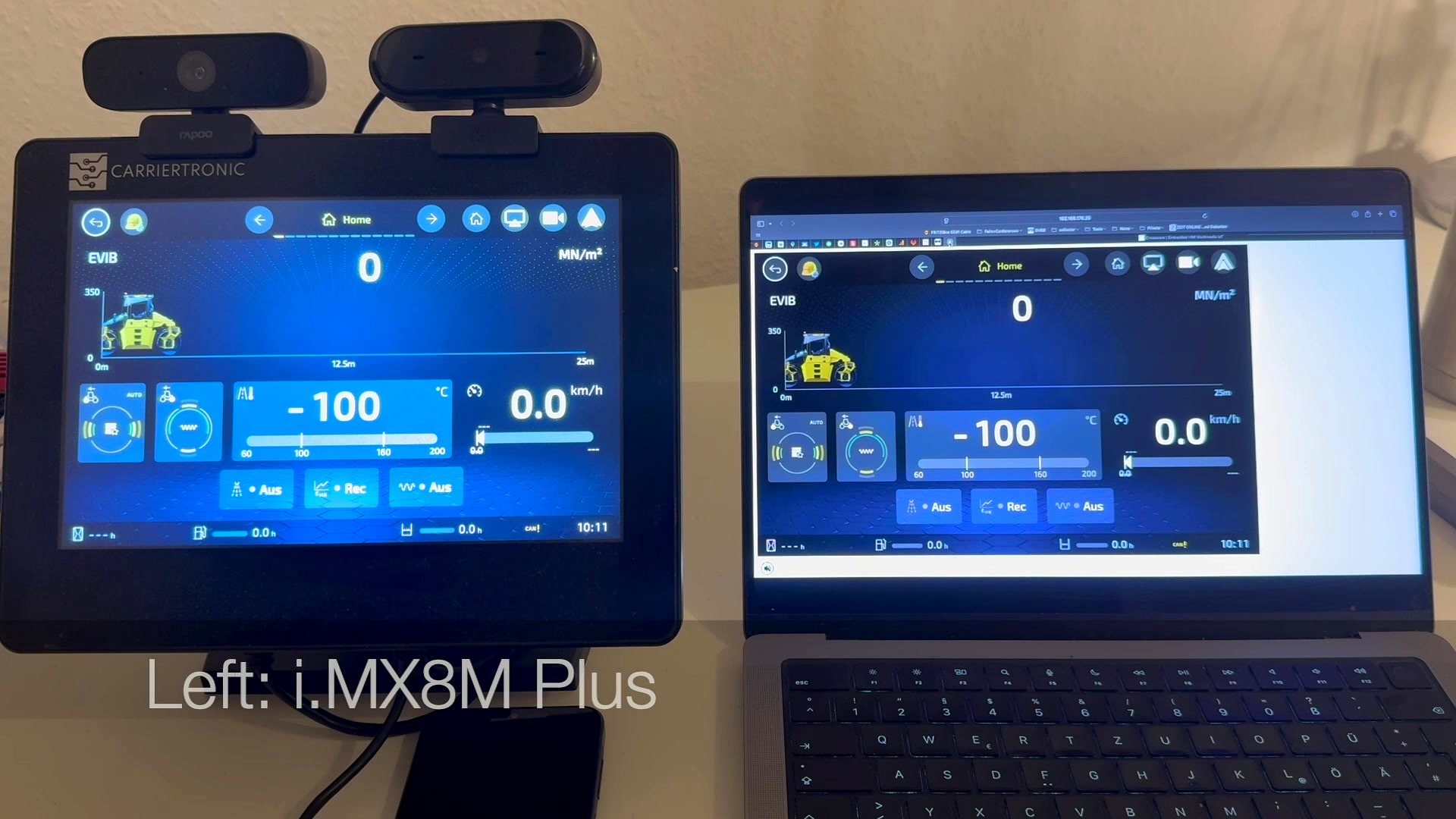
CrossPlay WebRTC screen mirroring, EVIB HMI simultaneously on embedded i.MX8M device and laptop
● Live on NXP i.MX8M Plus
01 · Screen sharing & remote display

Mirror any embedded UI to any screen.

CrossPlay streams a live Qt or native Linux application to a secondary display over the network with no changes to the application code. Shown: an industrial EVIB machine-control HMI running on an i.MX8M Plus, displayed simultaneously on the touch device and a connected laptop via WebRTC.

Qt integration WebRTC Zero-copy paths i.MX8M Plus
📷 Camera V4L2 · CSI 🖥 Screen KMS · Qt 🎬 Media H.264 · RTSP 📊 Data HMI overlay SOURCES GSTREAMER Compositor Decode Encode GPU Composition COMPOSITOR CAM SCR MED DATA OUTPUT
⬡ CDL Diagram
02 · Streaming compositor

Multiple video sources. One composed output.

The CrossPlay compositor combines camera feeds, screen captures, media streams and HMI data overlays into a single composed frame, hardware-accelerated via GStreamer and the GPU compositor. Layouts (speaker, gallery, horizontal) switch at runtime with no pipeline restart. Output is available locally and over the network simultaneously.

< 80ms Glass-to-glass latency target
H.264 / H.265 Hardware codec acceleration
GStreamer GPU composition Multi-layout WebRTC out
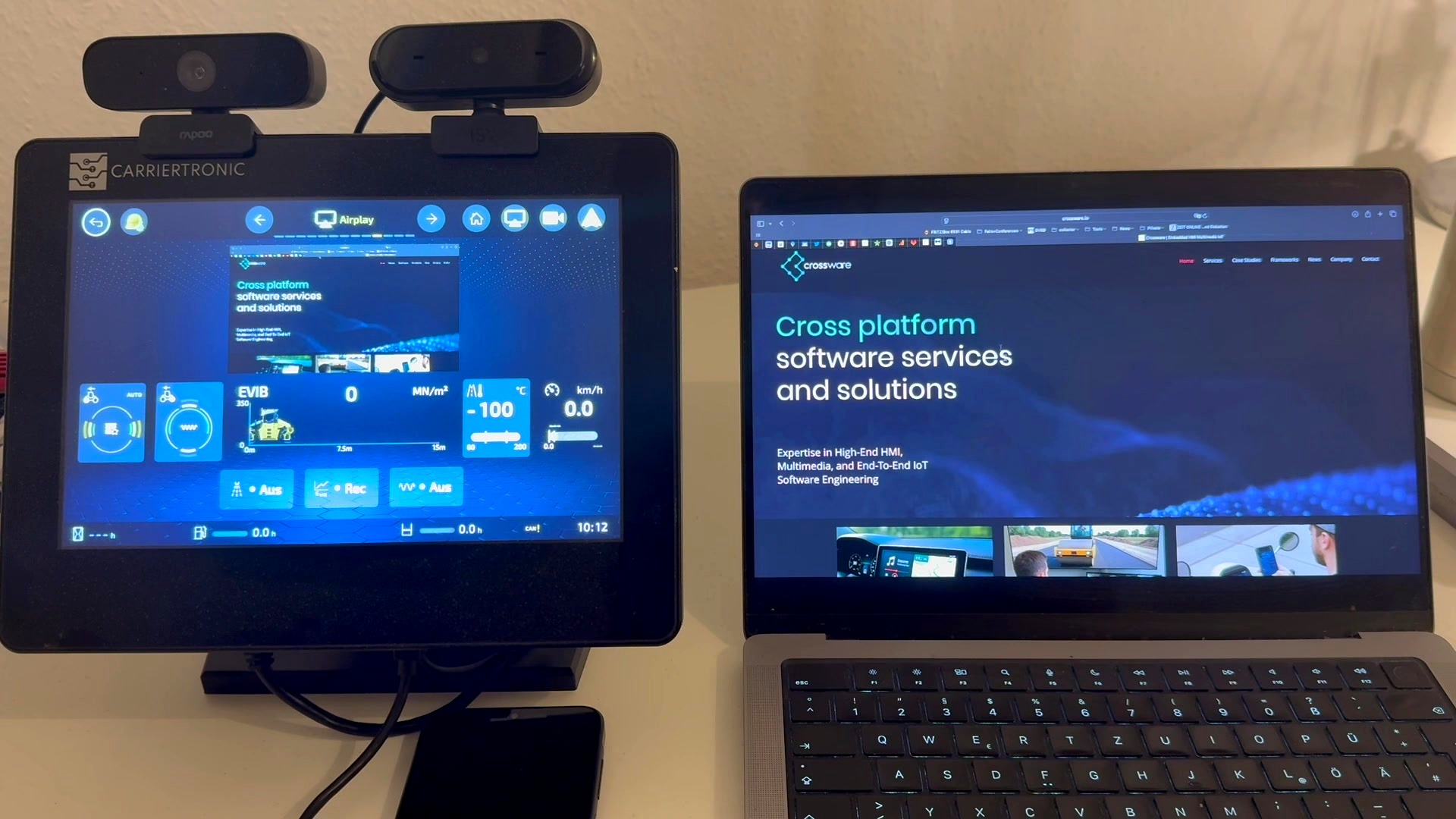
CrossPlay AirPlay integration, MacBook content projected to embedded display and mirrored simultaneously
● AirPlay on embedded Linux
03 · Phone & laptop projection

Project from any device. Display on any screen.

CrossPlay implements AirPlay, CarPlay and Android Auto receiver protocols, enabling embedded displays to accept projected content from iOS, macOS and Android without any cloud infrastructure. Shown: a MacBook projecting a browser session via AirPlay to an i.MX8M embedded touchscreen, with the full session simultaneously mirrored over WebRTC.

AirPlay receiver CarPlay Android Auto No cloud
Modular architecture

Integrate at the layer that makes sense for your product.

Crossware adapts CrossPlay to your hardware and product roadmap, not the other way around.

Mobile device Remote operator Cloud / peer Vehicle display
CROSSWARE CrossPlay Connected multimedia middleware
Session & control WebRTC GStreamer Composition Codec abstraction Device integration
Qt / QML Embedded Linux Android Hardware acceleration
Start with your use case

Build the connected experience your product needs.

Share your target hardware, OS and multimedia requirements. Crossware will propose the right CrossPlay architecture and implementation path for your roadmap.

Talk to our engineers →